
with their faulty lighting, in Sheffield city centre tonight.
07 November 2007


06 November 2007
My Favourite Favourite

Looking through my contacts' photos on flickr this evening, by far my favourite is this by Rebekka Guðleifsdóttir.
Amazing perspective, colours, composition and atmosphere.
22 October 2007
NPR - Think Pink
America's National Public Radio blog has used one of my photos :-)

They used it in an interesting entry about the commercialisation of breast cancer research 'products' which is a concern I have shared. I'm wary of the 'spend, spend, spend' and branding issues when we often don't know how much money from any given 'pink' product goes to cancer research, and there are usually better ways to help. Not to mention many of the 'pink' beauty etc. products which contain untold numbers of chemicals, some of which have possible links to causing cancer!
So, very glad they chose my photo in the first place, extra glad that it's accompanying an interesting article!
They used it in an interesting entry about the commercialisation of breast cancer research 'products' which is a concern I have shared. I'm wary of the 'spend, spend, spend' and branding issues when we often don't know how much money from any given 'pink' product goes to cancer research, and there are usually better ways to help. Not to mention many of the 'pink' beauty etc. products which contain untold numbers of chemicals, some of which have possible links to causing cancer!
So, very glad they chose my photo in the first place, extra glad that it's accompanying an interesting article!
What is NPR?
NPR (National Public Radio) is an internationally acclaimed producer and distributor of noncommercial news, talk, and entertainment programming. A privately supported, not-for-profit membership organization, NPR serves a growing audience of 26 million Americans each week in partnership with more than 860 independently operated, noncommercial public radio stations. Each NPR Member Station serves local listeners with a distinctive combination of national and local programming. With original online content and audio streaming, NPR.org offers hourly newscasts, special features and ten years of archived audio and information.
30 September 2007
Dreams. Edited in Photoshop CS3

Original image:

- Select the statue using the magnetic lasso tool
- Select > Modify > Feather > 5
- Image > Adjustments > Black and White
- Adjust the colours until the angel is how you want it.
- Select > Inverse
- Filter > Blur > Radial Blur
- Adjust the settings until the background is how you want it to be.
- Image > Adjustments > Hue & Saturation.
- Adjust the 'hue' until the background is how you want it.
- Select > Deselect
- Filter > Render > Lens Flare
- Move the lens flare to behind the statue's head.
- Filter > Render > Lighting Effects > Light Type > Omni
- Adjust all settings until it looks right. I moved the light to the statue's hands and adjusted the over / under exposure settings.
27 September 2007

Burma
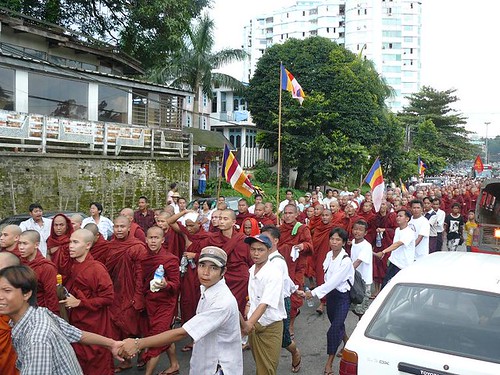
There are amazing people in Burma risking their lives to take, and spread, word, photographs and film of what is really happening there at the moment.
Two of these people are gmhembree and NaingKo on flickr.
Looking at these photos, direct from the people witnessing these events is powerful, and brings to mind the huge risks being taken for truth and democracy.
26 September 2007

06 September 2007


04 September 2007

13 August 2007
T189 Submissions B.
I have recently completed the Open University's T189 Digital Photography course.
As part of the final assignment, we had to submit 10 images. The ones I submitted are below (6 - 10)
Manor Lodge under a Moody Sky

Angled Red Brick Building and Clock on a Sunny Day

Capturing the Parenting of a New Chick

Brightly Coloured Market in a Park

The Bride Was a Vision in Scarlet

As part of the final assignment, we had to submit 10 images. The ones I submitted are below (6 - 10)
Manor Lodge under a Moody Sky
Angled Red Brick Building and Clock on a Sunny Day
Capturing the Parenting of a New Chick
Brightly Coloured Market in a Park
The Bride Was a Vision in Scarlet
T189 Submissions A.
I have recently completed the Open University's T189 Digital Photography course.
As part of the final assignment, we had to submit 10 images. The ones I submitted are below (1 - 5)
Birds of Paradise in the Winter Gardens

Flower Standing Out from the Crowd

The Golden Glow of Tulips

Julia's Arrangement of Flowers

Two Gravestones and Their Overgrown Companion

As part of the final assignment, we had to submit 10 images. The ones I submitted are below (1 - 5)
Birds of Paradise in the Winter Gardens
Flower Standing Out from the Crowd
The Golden Glow of Tulips
Julia's Arrangement of Flowers
Two Gravestones and Their Overgrown Companion
27 July 2007
Photography Links: social change and political change, photography blogs.
Social / Political change through Photography:
Photography contest promotes healthy image of aboriginal peoples
Lesbian Photography - Blatant Image
Tee Corinne, Photographer
Discussion on Representation of the Female Form in Photography
Photography blogs:
FEM Photo Blog
mjau
Photography contest promotes healthy image of aboriginal peoples
Lesbian Photography - Blatant Image
Tee Corinne, Photographer
Discussion on Representation of the Female Form in Photography
Photography blogs:
FEM Photo Blog
mjau
24 July 2007
BBC Britain in Pictures
The BBC had a recent series on BBC4, called Britain in Pictures, where photographers were encouraged to send in their photos of Britain's buildings. For recent weeks, a 'red button' channel on the BBC's digital network has been showing some of the pictures, in rotation, that members of the public have submitted.
I was rather overjoyed to find that (at least) 3 of my photos were shown on TV.
These were:
Manor Lodge, Sheffield

Hutton's Buildings, Sheffield

and Scarborough Castle

I was rather overjoyed to find that (at least) 3 of my photos were shown on TV.
These were:
Manor Lodge, Sheffield
Hutton's Buildings, Sheffield
and Scarborough Castle
22 July 2007
Interesting Links
Been gathering these for too long, without posting. Apologies, therefore, for length and lack of form!
The Center for Fine Art Photography
Kiyoji Otsuji's photo art : Arts Weekend : Features : DAILY YOMIURI ONLINE (The Daily Yomiuri)
San Francisco Sentinel » Blog Archives » HIROSHI SUGIMOTO – Retrospective of photographer’s work at the de Young Museum, July 7th – September 23rd
Photographs of Photographers. Shame that pornification gets everywhere though >:-(
'Real Photographer' Keith Arnatt At The Photographers' Gallery - 24 Hour Museum - official guide to UK museums, galleries, exhibitions and heritage
Royalty free photography on SnapVillage | Digital Camera Review
Teaching photography just one part of Greg Spira’s plan to help indigenous Bolivian women find a political voice
Understanding Histograms
Introduction to Filters for DSLRs
northjersey.com - Montclair Times Community
BBC NEWS | World | Middle East | Photos bridge Arab-Israeli divide
How to love photography | Reviews | Visual Arts | Arts | Telegraph
Your majesty, you were one of the luckier subjects . . . - Times Online
TrustedReviews - Photography Tutorial – Dynamic Range And How To Fake It
The Center for Fine Art Photography
Kiyoji Otsuji's photo art : Arts Weekend : Features : DAILY YOMIURI ONLINE (The Daily Yomiuri)
San Francisco Sentinel » Blog Archives » HIROSHI SUGIMOTO – Retrospective of photographer’s work at the de Young Museum, July 7th – September 23rd
Photographs of Photographers. Shame that pornification gets everywhere though >:-(
'Real Photographer' Keith Arnatt At The Photographers' Gallery - 24 Hour Museum - official guide to UK museums, galleries, exhibitions and heritage
Royalty free photography on SnapVillage | Digital Camera Review
Teaching photography just one part of Greg Spira’s plan to help indigenous Bolivian women find a political voice
Understanding Histograms
Introduction to Filters for DSLRs
northjersey.com - Montclair Times Community
BBC NEWS | World | Middle East | Photos bridge Arab-Israeli divide
How to love photography | Reviews | Visual Arts | Arts | Telegraph
Your majesty, you were one of the luckier subjects . . . - Times Online
TrustedReviews - Photography Tutorial – Dynamic Range And How To Fake It
04 July 2007
Making a Modern Photo Look 'Vintage' using Elements.
Turning this:

into this:

into this:
- Open the image you want to work on
- Check you are working in 'RGB' mode (Image > Mode >RGB)
- Duplicate background layer
- Window > Artwork & Effects
- In the Artwork & Effects palette on the right, choose the third icon along, then below, choose Photo Effects and Image Effects
- Highlight 'Tint Sepia' and drag the highlighted icon onto your image
- Filter > Noise > Add Noise
- Alter this as appropriate
- Bottom left - set foreground colour to a cream colour
- Layer > Fill Layer > Solid Colour
- Select the cream colour you chose. OK
- With your Colour Fill layer highlighted, but its 'eye' icon deselected (so you are working on the fill layer, but can't see it), use Elliptical Marquee Tool to draw an oval around the part of the image to be framed. Use the arrow keys to move the shape around
- Select > Feather > 25 (or so, experiment!)
- Make sure the Colour Fill layer is selected, and select the 'eye' icon to its left, then Edit > Delete
- This will show you the image in sepia, surrounded by a cream frame
- When you are happy, Select > Deselect
- If the framed image is off-centre, then Layer > Merge Down will merge the frame and sepia layers
- Highlight Background Copy layer and Fill Layer as before, using exactly the same Foreground colour which should still be selected
- Reselect sepia framed layer and select the Move tool. Move the image to a central point, then deselect
- Layer > Flatten image
30 June 2007
Sheffield Pick of the Week
Flickr Sheffield POTW #54 - andy2boyz «
Andy2boyz has made my night by picking one of my pics for the Sheffield Flickr blog.
He has also posed questions about whether the colour is manipulated... make your own mind up!

Andy2boyz has made my night by picking one of my pics for the Sheffield Flickr blog.
He has also posed questions about whether the colour is manipulated... make your own mind up!
27 June 2007
18 June 2007
Warholisation - How I Did It in Photoshop Elements

- Open a portrait, ideally a head or head and shoulders shot.
- Layer > Duplicate Layer
- Filter > Stylize > Solarize
- Filter > Adjustments > Invert
- Layer > New Adjustment Layer > Brightness and Contrast
- Play around with the brightness and contrast settings until you are happy.
- Layer > New Adjustment Layer > Hue and Saturation
- Play around, especially with different hues, until you are pleased with the resulting colours
- Using magnetic lasso tool, draw around the shoulders, neck, hair, head etc.
- Right click on the image and choose 'Select Inverse'
- Right click on image, click Feather
- Layer > New Fill Layer > Solid Colour
- Pick your Colour. Press OK.
- Crop the image if necessary
- Layer > Flatten Image
- Save your image


13 June 2007
BBC Britain in Pictures
The following of my photos are on the BBC Britain in Pictures website. How excited am I?! (I can't view that page with firefox btw).
Park Hill flats, Sheffield.
Jessop Hospital for Women, Sheffield
Claywood Flats, Sheffield - Demolition by Nibbler
Weston Park Museum, Sheffield
Firth Court, University of Sheffield
Sheffield Town Hall
Winter Gardens, Sheffield


Subscribe to:
Posts (Atom)

Links
Who links to my website?
 |

 Ping-O-Matic
| Back • Next • Join • |
| Homepage |

 <<
?
hoopty
girls
#
>>
<<
?
hoopty
girls
#
>>

Powered By Ringsurf


 «#Euro Blogs?»
 «#Blogging Brits?»
 <<
#
Gay Brits
?
>>
<<
#
Gay Brits
?
>>
| ||||

Rate Me on BlogHop.com!


 help?
help?

« ? blog-girls # » photoblogs.org << # GeekLog ? >>
|
|
|

[ Previous 5 Sites | Skip Previous | Previous | Next ]
This RingSurf Photo Passion Net Ring
owned by LAURA'S PLACE.
[ Skip Next | Next 5 Sites | Random Site | List Sites ]
|
owned by ***Super-Shopping-Mall***. sponsored by ***Super-Shopping-Mall***. Sign Up Here: Click Here.
|
|

|
<
#
I dig 4images
?
>
|
 RingSurf Cultural Creatives Ring | Random Site | List Sites | Ring created by EcoChoices EcoLiving Center. |


Powered by RingSurf
